Skip to content
Facebook-f Twitter Instagram Youtube

Updating Large Format Printer & CNC Machine News Blog

  • Machines
    • 3D Printing
    • CNC Plasma Cutting
    • CNC Router
    • CO2 Laser Cutting
    • Direct to Film (DTF) Printing
    • Fiber Laser Cleaning System
    • Fiber Laser Cutting
    • Fiber Laser Engraving
    • Film Cutting
    • Flatbed Cutting Machine
    • Flatbed Printer
    • Heat Press
    • Laminator
    • Large Format Printer
    • Laser Marking
    • Power Equipment
    • Screen Printing
    • Vinyl Cutting
    • Welding
  • Consumables
    • ECO-Solvent Inks
    • Label Paper
    • Spindles
    • Sublimation
    • Toolings
    • UV Inks
  • Software & Resources
  • News and Updates
    • Events & Expo
    • Stock Updates
    • New Machinery
    • Warehouse Updates
    • Media & Press
  • Machines
    • 3D Printing
    • CNC Plasma Cutting
    • CNC Router
    • CO2 Laser Cutting
    • Direct to Film (DTF) Printing
    • Fiber Laser Cleaning System
    • Fiber Laser Cutting
    • Fiber Laser Engraving
    • Film Cutting
    • Flatbed Cutting Machine
    • Flatbed Printer
    • Heat Press
    • Laminator
    • Large Format Printer
    • Laser Marking
    • Power Equipment
    • Screen Printing
    • Vinyl Cutting
    • Welding
  • Consumables
    • ECO-Solvent Inks
    • Label Paper
    • Spindles
    • Sublimation
    • Toolings
    • UV Inks
  • Software & Resources
  • News and Updates
    • Events & Expo
    • Stock Updates
    • New Machinery
    • Warehouse Updates
    • Media & Press
Search
Facebook Twitter Instagram Youtube

Updating Large Format Printer & CNC Machine News Blog

  • Machines
    • 3D Printing
    • CNC Plasma Cutting
    • CNC Router
    • CO2 Laser Cutting
    • Direct to Film (DTF) Printing
    • Fiber Laser Cleaning System
    • Fiber Laser Cutting
    • Fiber Laser Engraving
    • Film Cutting
    • Flatbed Cutting Machine
    • Flatbed Printer
    • Heat Press
    • Laminator
    • Large Format Printer
    • Laser Marking
    • Power Equipment
    • Screen Printing
    • Vinyl Cutting
    • Welding
  • Consumables
    • ECO-Solvent Inks
    • Label Paper
    • Spindles
    • Sublimation
    • Toolings
    • UV Inks
  • Software & Resources
  • News and Updates
    • Events & Expo
    • Stock Updates
    • New Machinery
    • Warehouse Updates
    • Media & Press
  • Machines
    • 3D Printing
    • CNC Plasma Cutting
    • CNC Router
    • CO2 Laser Cutting
    • Direct to Film (DTF) Printing
    • Fiber Laser Cleaning System
    • Fiber Laser Cutting
    • Fiber Laser Engraving
    • Film Cutting
    • Flatbed Cutting Machine
    • Flatbed Printer
    • Heat Press
    • Laminator
    • Large Format Printer
    • Laser Marking
    • Power Equipment
    • Screen Printing
    • Vinyl Cutting
    • Welding
  • Consumables
    • ECO-Solvent Inks
    • Label Paper
    • Spindles
    • Sublimation
    • Toolings
    • UV Inks
  • Software & Resources
  • News and Updates
    • Events & Expo
    • Stock Updates
    • New Machinery
    • Warehouse Updates
    • Media & Press
Search
Lens-Cleaning Fiber laser

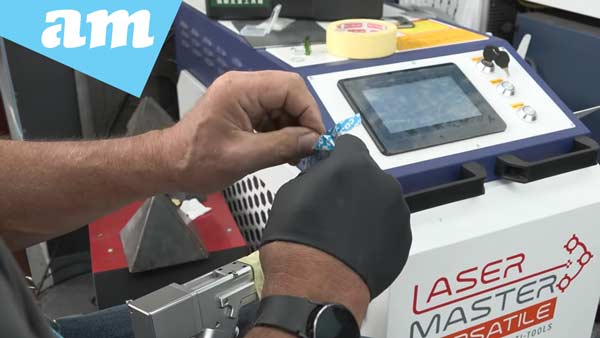
Lens Cleaning and Changing Steps for Laser Machines with Fiber Laser System

Dust on the lens is a real pain for anyone using a high-powered laser machine with a Fiber Laser System. Those tiny specks can sneak in, get cooked by the laser’s heat, and stick to the lens, messing up your cuts or even wrecking the lens for good if you don’t deal with it fast. Here’s a straightforward guide to get your machine back on track.

Watch Video on YouTube: https://youtu.be/LxRVXtE-_-o?si=5KpXXFgbVwHnOZHb

Step 1: Check the Lens First

If your laser’s acting wonky—weak cuts, weird burns, or just flat-out dead—start by looking at the lens. Nine times out of ten, that’s where the trouble is. Make sure you’re in a clean spot before you start poking around; you don’t want more dust making things worse.

Step 2: Shut It Down and Cover It Up

Turn the machine off completely—no half-measures. Pop off the lens holder carefully, and right away, slap some masking tape over the opening. This keeps dust from sneaking into the guts of the machine while you’re working.

Step 3: Pull the Lenses Out

Take out the protective lens first, then the focus lens. Go slow and steady—scratching these is a rookie move that’ll cost you.

Step 4: Clean or Swap the Focus Lens

Give the focus lens a good once-over:

  • If it’s toast (think cracks, burn marks, or just looking rough), get a new one that fits your machine.
  • If it’s just gunked up with dust, grab an optical lens wipe. Wipe in one direction only, turn the lens a bit, then wipe again with a fresh wipe. Don’t scrub back and forth; that’s how you scratch it.

Step 5: Put It All Back

Once the lens is clean or replaced, slide it back into the holder and lock it into the machine. This fix works for a bunch of models like the Laser Master Versatile, Rust-Off, and Ray Cut.

Step 6: Test It Out

Fire up the machine and run a quick test cut. If it’s slicing clean and smooth, you’re back in business.

Why You Can’t Skip Maintenance

Fancy laser machines like the ones from AM.CO.ZA are game-changers for shops and businesses, but they’re not set-it-and-forget-it. Stay on top of cleaning and upkeep, or you’ll be stuck with downtime and pricey repairs.

In a time where AI and smart technologies are transforming industries, AM.CO.ZA has emerged as a leader in CNC routers and printing machines. With more than 11 years of experience, they offer a diverse range of advanced products, including CNC Routers, Large Format Printers, Vinyl Cutters, Laser Cutters, Plasma Cutters, and DTF Printers. Their solutions serve a wide array of sectors, from manufacturing and engineering to the creative arts.

Machines, Consumables and Parts Available from https://buythis.co.za/

For more info on Advanced Machinery visit https://am.co.za/

Subscribe to AM.CO.ZA’s YouTube Channel: https://www.youtube.com/@AchievementMatters?sub_confirmation=1

Chat with us by sending “hi” on WhatsApp to 060 600 6000​.

PrevPrevious Update
Next UpdateNext
  • Enquiry: 060 600 6000
  • Support: 076 666 6655
  • Training: 060 818 1818
  • Jo’burg : 087 802 5368
  • Cape Town : 087 802 5368
Chat to us by sending “hi” on Whatsapp: 060 600 6000​
Envelope Youtube Facebook Pinterest Twitter Instagram

This website is developed by Advanced Machinery (Pty) Ltd. The domain name updating.co.za is the property of Bates Trust IT003077/2015(G), and its exclusive use is licensed to Advanced Machinery (Pty) Ltd All other materials contained on this website and all associated websites, including text, graphics, icons, still and moving images, sound recordings, musical compositions, audio-visual works and software, are the property of Advanced Machinery (Pty) Ltd or its content suppliers or service providers and are protected by South African and international copyright laws. All trademarks, service marks, trade names, trade dress, product names and logos appearing on the site are the property of their respective owners.