Skip to content
Facebook-f Twitter Instagram Youtube

Updating Large Format Printer & CNC Machine News Blog

  • Machines
    • 3D Printing
    • CNC Plasma Cutting
    • CNC Router
    • CO2 Laser Cutting
    • Direct to Film (DTF) Printing
    • Fiber Laser Cleaning System
    • Fiber Laser Cutting
    • Fiber Laser Engraving
    • Film Cutting
    • Flatbed Cutting Machine
    • Flatbed Printer
    • Heat Press
    • Laminator
    • Large Format Printer
    • Laser Marking
    • Power Equipment
    • Screen Printing
    • Vinyl Cutting
    • Welding
  • Consumables
    • ECO-Solvent Inks
    • Label Paper
    • Spindles
    • Sublimation
    • Toolings
    • UV Inks
  • Software & Resources
  • News and Updates
    • Events & Expo
    • Stock Updates
    • New Machinery
    • Warehouse Updates
    • Media & Press
  • Machines
    • 3D Printing
    • CNC Plasma Cutting
    • CNC Router
    • CO2 Laser Cutting
    • Direct to Film (DTF) Printing
    • Fiber Laser Cleaning System
    • Fiber Laser Cutting
    • Fiber Laser Engraving
    • Film Cutting
    • Flatbed Cutting Machine
    • Flatbed Printer
    • Heat Press
    • Laminator
    • Large Format Printer
    • Laser Marking
    • Power Equipment
    • Screen Printing
    • Vinyl Cutting
    • Welding
  • Consumables
    • ECO-Solvent Inks
    • Label Paper
    • Spindles
    • Sublimation
    • Toolings
    • UV Inks
  • Software & Resources
  • News and Updates
    • Events & Expo
    • Stock Updates
    • New Machinery
    • Warehouse Updates
    • Media & Press
Search
Facebook Twitter Instagram Youtube

Updating Large Format Printer & CNC Machine News Blog

  • Machines
    • 3D Printing
    • CNC Plasma Cutting
    • CNC Router
    • CO2 Laser Cutting
    • Direct to Film (DTF) Printing
    • Fiber Laser Cleaning System
    • Fiber Laser Cutting
    • Fiber Laser Engraving
    • Film Cutting
    • Flatbed Cutting Machine
    • Flatbed Printer
    • Heat Press
    • Laminator
    • Large Format Printer
    • Laser Marking
    • Power Equipment
    • Screen Printing
    • Vinyl Cutting
    • Welding
  • Consumables
    • ECO-Solvent Inks
    • Label Paper
    • Spindles
    • Sublimation
    • Toolings
    • UV Inks
  • Software & Resources
  • News and Updates
    • Events & Expo
    • Stock Updates
    • New Machinery
    • Warehouse Updates
    • Media & Press
  • Machines
    • 3D Printing
    • CNC Plasma Cutting
    • CNC Router
    • CO2 Laser Cutting
    • Direct to Film (DTF) Printing
    • Fiber Laser Cleaning System
    • Fiber Laser Cutting
    • Fiber Laser Engraving
    • Film Cutting
    • Flatbed Cutting Machine
    • Flatbed Printer
    • Heat Press
    • Laminator
    • Large Format Printer
    • Laser Marking
    • Power Equipment
    • Screen Printing
    • Vinyl Cutting
    • Welding
  • Consumables
    • ECO-Solvent Inks
    • Label Paper
    • Spindles
    • Sublimation
    • Toolings
    • UV Inks
  • Software & Resources
  • News and Updates
    • Events & Expo
    • Stock Updates
    • New Machinery
    • Warehouse Updates
    • Media & Press
Search
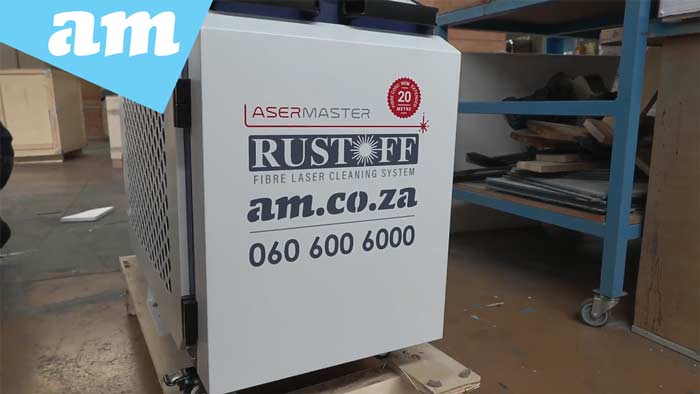
Operate LaserMaster RustOff

Operate LaserMaster RustOff with Wobble Pattern Selection and Lens Cleaning and Change

To get started with your LaserMaster RustOff Laser Cleaner, first switch on the chiller and give it a few seconds to boot up. Once it’s running, head to the startup screen and open the Parameters section. This is where you’ll choose your cleaning pattern and set the laser power to match your needs.

Each pattern has a different scan length and width; most go up to around 212 mm, but if you’re working with a straight line, you can push it up to 300 mm. Once you’ve picked your settings and you’re happy with them, go ahead and turn the laser on.

Next, press Stop Cleaning. You’ll see a red triangle appear, which means the laser is active. Wait about 30 seconds for everything to stabilise, and then you’re good to start cleaning.

If the temperature reading suddenly turns red and the machine shuts down, don’t panic. That usually means the laser’s protective lens is dirty or burnt, often because of dusty air. Just replace the lens before continuing — it’s a quick fix.

When you’re done, click Ready for Cleaning to wrap up, then switch off both the laser and the chiller. And that’s it — your LaserMaster RustOff is ready for its next job.

In a time where AI and smart technologies are transforming industries, AM.CO.ZA has emerged as a leader in CNC routers and printing machines. With more than 11 years of experience, they offer a diverse range of advanced products, including CNC Routers, Large Format Printers, Vinyl Cutters, Laser Cutters, Plasma Cutters, and DTF Printers. Their solutions serve a wide array of sectors, from manufacturing and engineering to the creative arts.

Machines, Consumables and Parts Available from https://buythis.co.za/

For more info on Advanced Machinery visit https://am.co.za/

Subscribe to AM.CO.ZA’s YouTube Channel: https://www.youtube.com/@AchievementMatters?sub_confirmation=1

Chat with us by sending “hi” on WhatsApp to 060 600 6000​.

PrevPrevious Update
Next UpdateNext
  • Enquiry: 060 600 6000
  • Support: 076 666 6655
  • Training: 060 818 1818
  • Jo’burg : 087 802 5368
  • Cape Town : 087 802 5368
Chat to us by sending “hi” on Whatsapp: 060 600 6000​
Envelope Youtube Facebook Pinterest Twitter Instagram

This website is developed by Advanced Machinery (Pty) Ltd. The domain name updating.co.za is the property of Bates Trust IT003077/2015(G), and its exclusive use is licensed to Advanced Machinery (Pty) Ltd All other materials contained on this website and all associated websites, including text, graphics, icons, still and moving images, sound recordings, musical compositions, audio-visual works and software, are the property of Advanced Machinery (Pty) Ltd or its content suppliers or service providers and are protected by South African and international copyright laws. All trademarks, service marks, trade names, trade dress, product names and logos appearing on the site are the property of their respective owners.